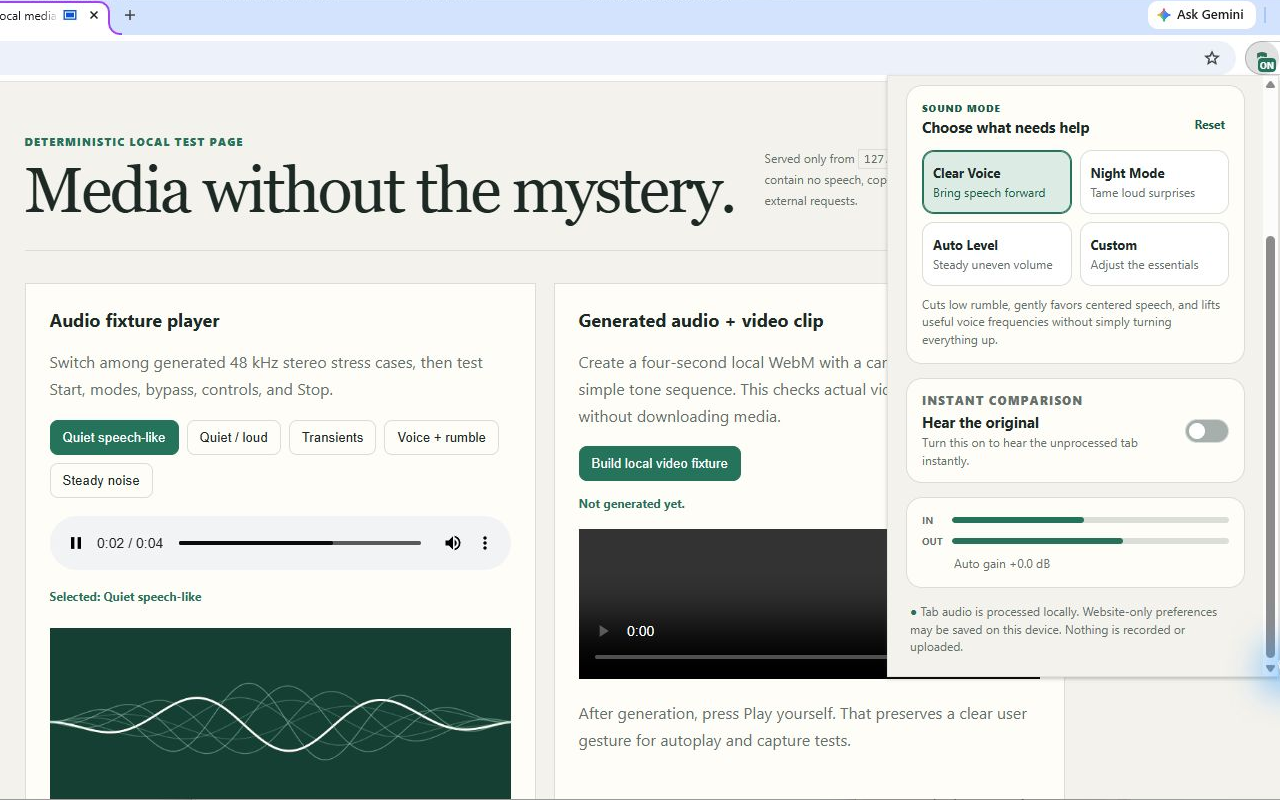
Bring speech forward
Clear Voice
Reduces low rumble, gently favors centered dialogue, and lifts useful voice frequencies.
 Dialogue GuardClear voices. Calmer volume.v0.1.0 store-ready
Local audio clarity for Chrome
Dialogue Guard makes speech easier to follow and reduces disruptive volume changes in the tab you choose—without recording, uploading, or reading the page.
Store-ready package. Chrome Web Store availability pending.
0audio uploads
0host permissions
0analytics calls
4purposeful modes
One tab. One click. Your control.
Dialogue Guard runs a bounded Web Audio signal chain only after you choose a tab. The page never receives the processed audio or control data.
Open the toolbar control while your video, call, lecture, or podcast is playing.
Choose clearer speech, calmer nights, slow auto-leveling, or five bounded custom controls.
Use instant bypass to hear the original, then stop at any time to restore normal tab audio.
Purpose over clutter
No ten-band equalizer required. Defaults stay conservative and every boost is capped.
Bring speech forward
Reduces low rumble, gently favors centered dialogue, and lifts useful voice frequencies.
Tame loud surprises
Compresses disruptive jumps while keeping a conservative output ceiling.
Steady uneven volume
Moves slowly, pauses below its noise gate, and stays inside your selected boost limit.
Adjust the essentials
Five bounded controls for clarity, compression, output, auto boost, and leveling strength.
The real installed extension
This is an authentic Chrome capture of v0.1.0 processing a generated local audio fixture. The toolbar popup shows the selected mode, instant comparison, and live input/output meters.
Measured, not magical
Reproducible synthetic fixtures challenge rumble, centered speech, loud transients, silence, steady noise, uneven programs, and near-clipping input. They supplement real listening tests; they do not stand in for them.
Read compatibility and limitationsThe shortest data policy is no data pipeline
Straight answers
Dialogue Guard is intentionally narrow. These boundaries are part of the product.
No. The selected tab’s live audio is processed temporarily by packaged browser code and played to your local audio device. There is no recorder, server, analytics SDK, or audio storage path.
No. It uses deterministic equalization, stereo-center focus, compression, and slow level control. It can improve many mixes, but it cannot recover separate stems or promise AI voice isolation.
Chrome allows tab audio capture only after an explicit user action. Dialogue Guard processes one tab you choose and stops cleanly when you tell it to stop or when the tab closes.
No extension can capture Chrome’s protected pages, the Chrome Web Store, or other extension pages. Media, DRM, fullscreen, and site behavior can also vary; the public compatibility notes will reflect actual release testing.
No. The production manifest has no host permissions and no content scripts. It uses active-tab permission, tab capture, local storage, and an offscreen audio document.
No. The limiter reduces digital clipping risk inside the extension, but listening safety also depends on your device, system volume, equipment, source, and exposure time.
Release status
The extension, deterministic audio tests, real-browser matrix, privacy documents, store screenshots, release package, and public support pages are ready. Chrome Web Store installation will become available only after Google reviews and approves the listing.